Content Server
Below is the configuration needed for a S3 Content Server.
*** please refer to the section Follow Up S3 Team Tasks for more information on required indexes ***
- Under "Connections" click "S3"
- Under "S3" click modify on a previously created box connection.
- Click "Add Content Server"
- Hover over each input box to see example values.
- Click "Add"
- Click "Save".
- Restart service via Windows services.
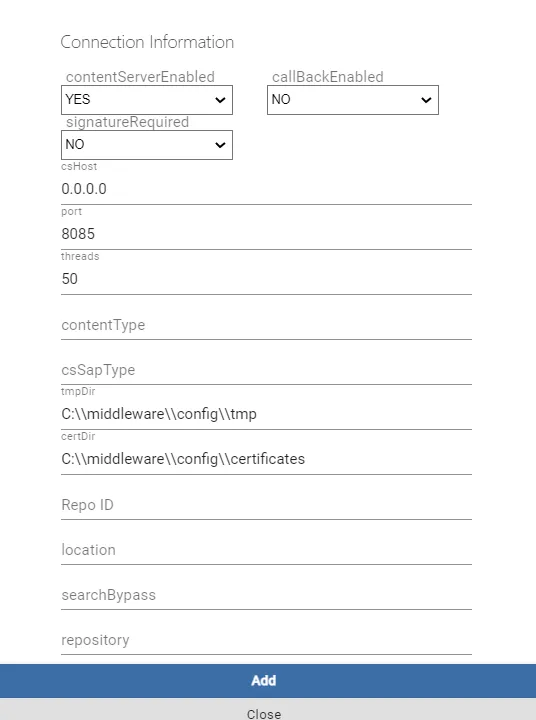
Image CaptionImage alt text
The below table is a description of each configuration entry above, along with possible value.
Setting | Description | Sample Value(s) |
|---|---|---|
enabled | YES/NO | Yes to enable, No to not but still configure. |
signature required | YES | Used for verify authentic origin requests. |
csHost | Binds to local IP address | 127.0.01 |
port | Port we want content server to be deployed on. | 8089 |
threads | Max Number of threads to allocate for parallel processing. | 50 |
contentType | CMS Custom metadata needs to specify the name of template | invoices |
SAPType | Configured SAP System utilized | S4 |
tmpDir | Directory to temporary use for storage | C:\\<connector install directory>\\config\\tmp |
certDir | Directory where certificates are located | C:\\<connector install directory>\\config\\certificates |
RepoId | SAP repository for content Server | ZS |
Location | S3 Bucket ID | For S3: i.e. 13213213 |
repository | For S3 n/a | n/a |
callBackEnabled(for version 6.6.8) | Enable callbackHandler to link and monitor content server activities from SAP and to allow for ECM/SAPDocID mapping. ie: for each content server call from SAP to M365, a separate return call is made via SAP Jco RFC to log in the docuflow SAP Gateway as well for a CREATE, it will map SAPDocID to the ECM M365 object id. The recommended setting is YES as this will support:
In extremely high volume content server scenarios where no ECM will be in play, this setting should be set to NO | YES |
*the Windows service must be restarted for changed to take effect